Travel Logs

Automated Vehicle Logbook

Features for Fleets & Teams

Small businesses to large organisations

Managed Vehicles

Shared fleet vehicles

Submit

Submit records from the app or web portal

Fleet Reports

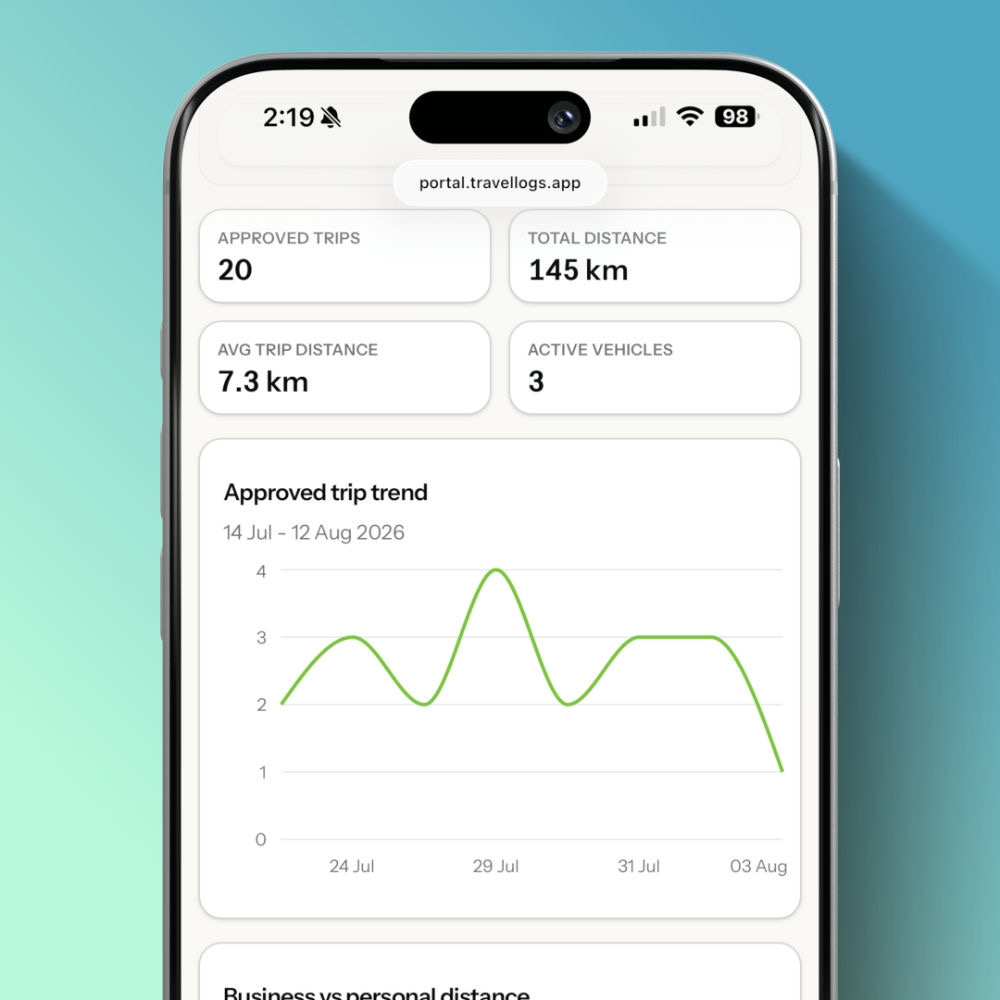
Generate reports for your fleet

Fleet Management

Manage your drivers

Collection & Validation

Collect records and validate it before acceptance

Vehicle management for teams

Drivers can submit their local Travel Logs records to a fleet team for review. Fleet reviewers can manage submissions from the Fleet dashboard, view each record’s current status, leave comments, approve valid records, reject submissions that need correction, and report on submitted vehicle records.

With built-in comments, drivers and reviewers can discuss submissions without losing context, making it easier to clarify details, request changes, and keep the review process organised.

Travel Logs Fleets helps teams collect, review, discuss, approve, reject, and report on vehicle records — all in one place.

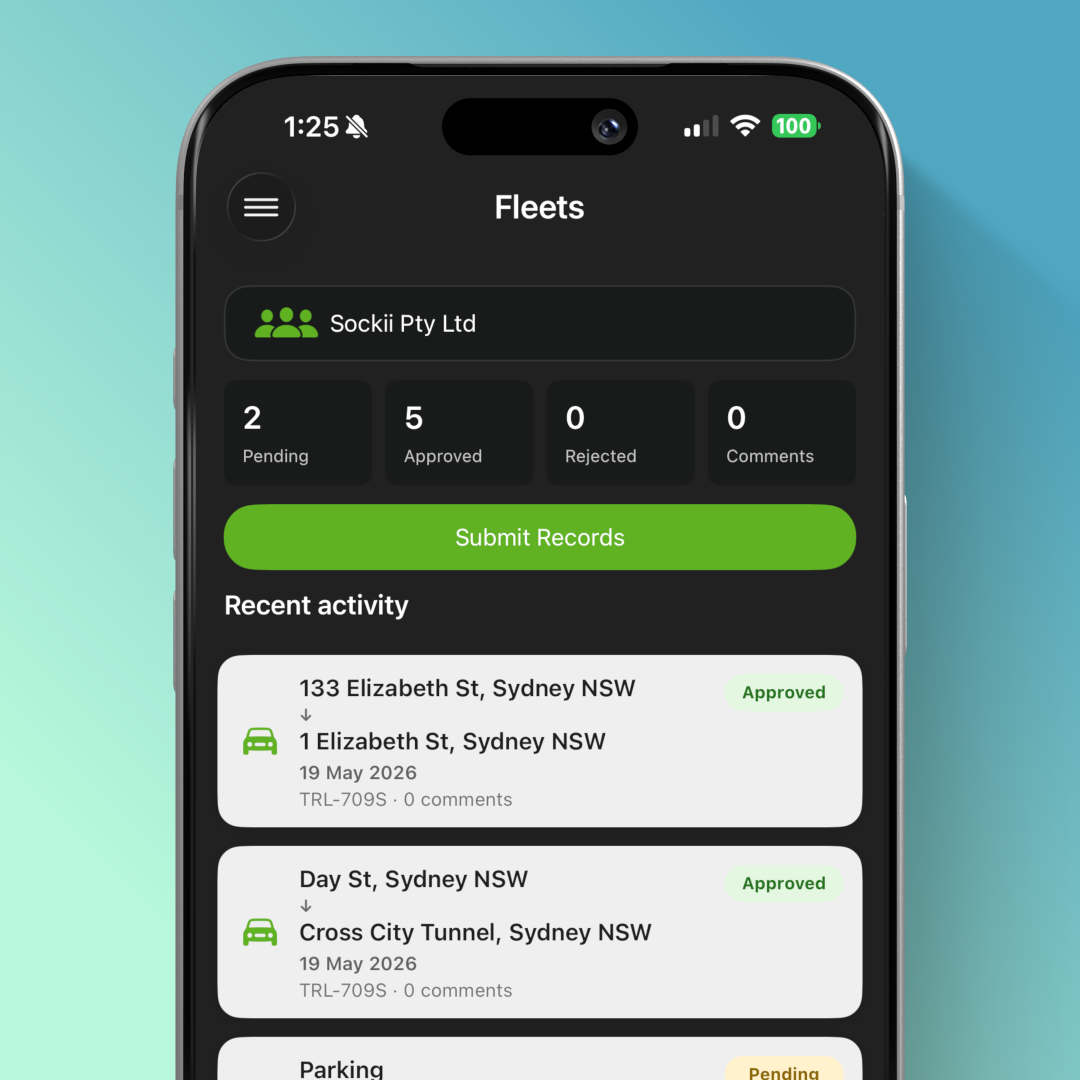
Fleet record submission on app

Easy record submission

Fleet features allow drivers to submit their local Travel Logs records directly to a fleet team on the app or web portal.

This makes it easier for businesses, teams, and organisations to collect vehicle information from multiple drivers in one place. Instead of relying on screenshots, emails, spreadsheets, or separate reports, submitted records can be reviewed and managed through the Fleet dashboard.

Drivers stay in control of their records, while fleet teams get a clear workflow for reviewing what has been submitted.

Fleet inbox dashboard

Collect & Validate Records

The Fleet dashboard gives reviewers a central place to manage submitted vehicle records.

Each submission includes its current status, helping teams quickly see what is pending, approved, rejected, or needs attention. Reviewers can assess submitted trips, expenses, maintenance records, and supporting details before deciding what action to take.

Adding comments make it easier for drivers and reviewers to discuss submitted records without losing context.
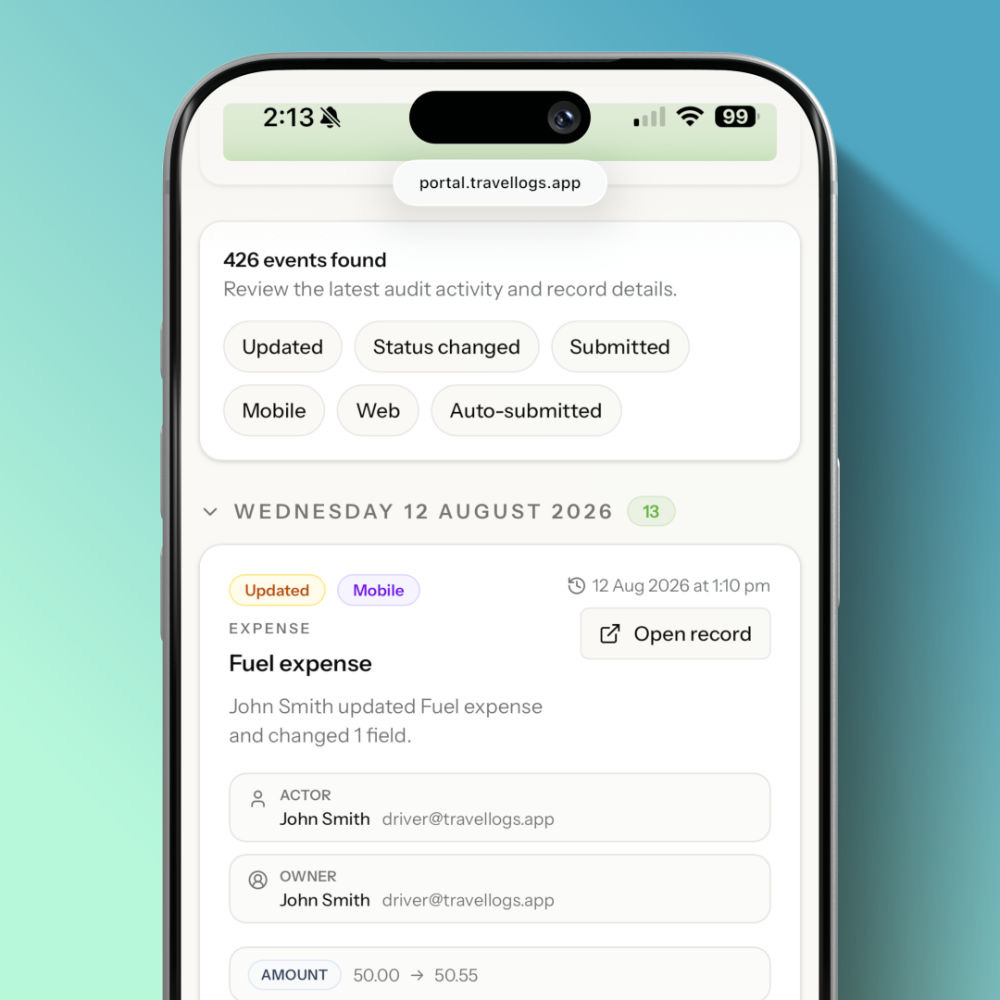
Audit logs provide a clear history of changes made to a travel record. They help teams understand what changed, who made the change, and when it happened.Audit logs are read-only and cannot be edited. They are retained to support compliance, troubleshooting, and internal review.

Central billing for fleets

Centralised Billing

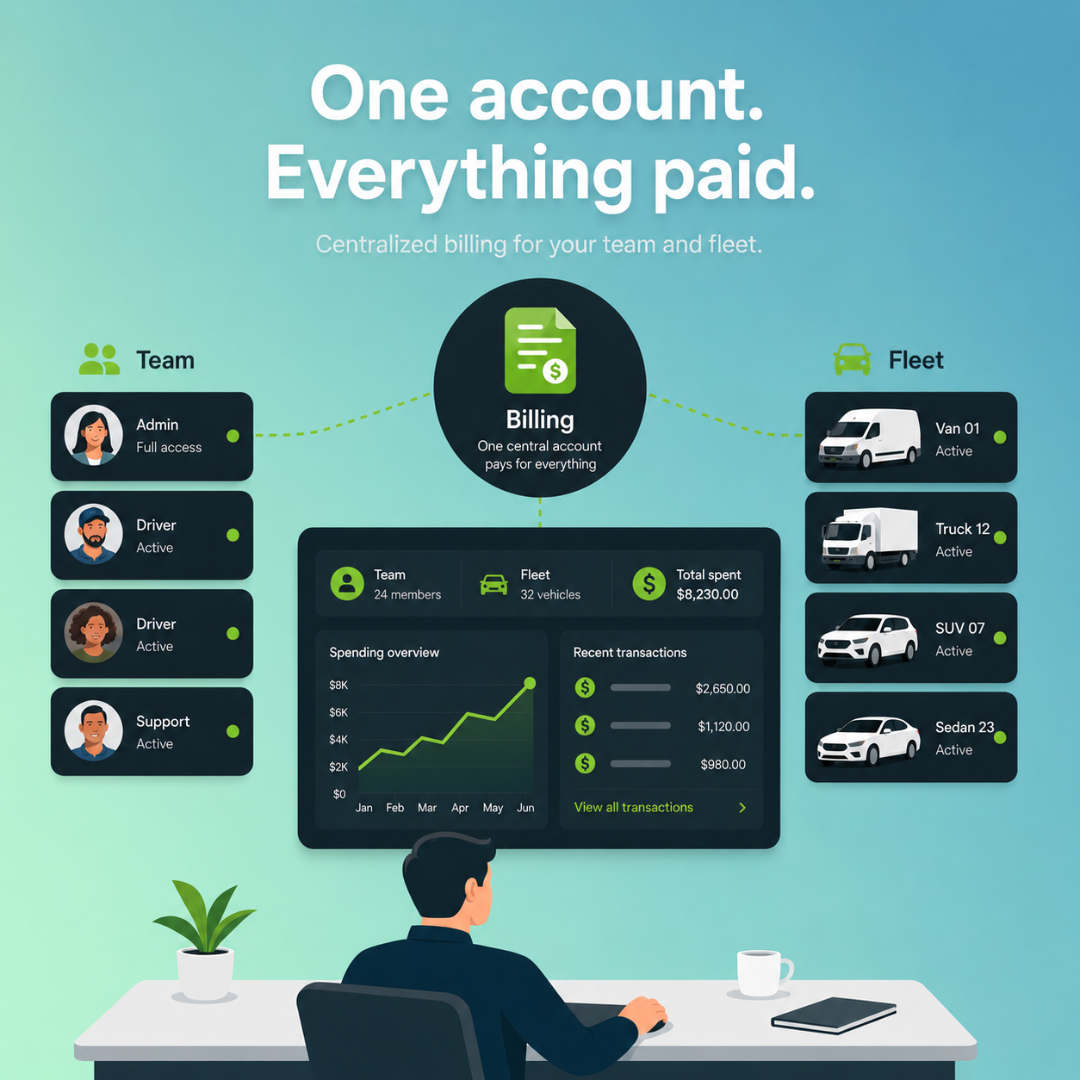
Centralised Fleet billing lets one team manager pay for Travel Logs on behalf of all members. Instead of each user managing their own subscription, the business controls billing, access, and member management from one place.

It means one invoice, one payment method, easier accounting, and simpler onboarding for new team members. Fleet members get access automatically, while managers stay in control as the team grows.

Fleet managed shared vehicles

Fleet Managed Vehicles

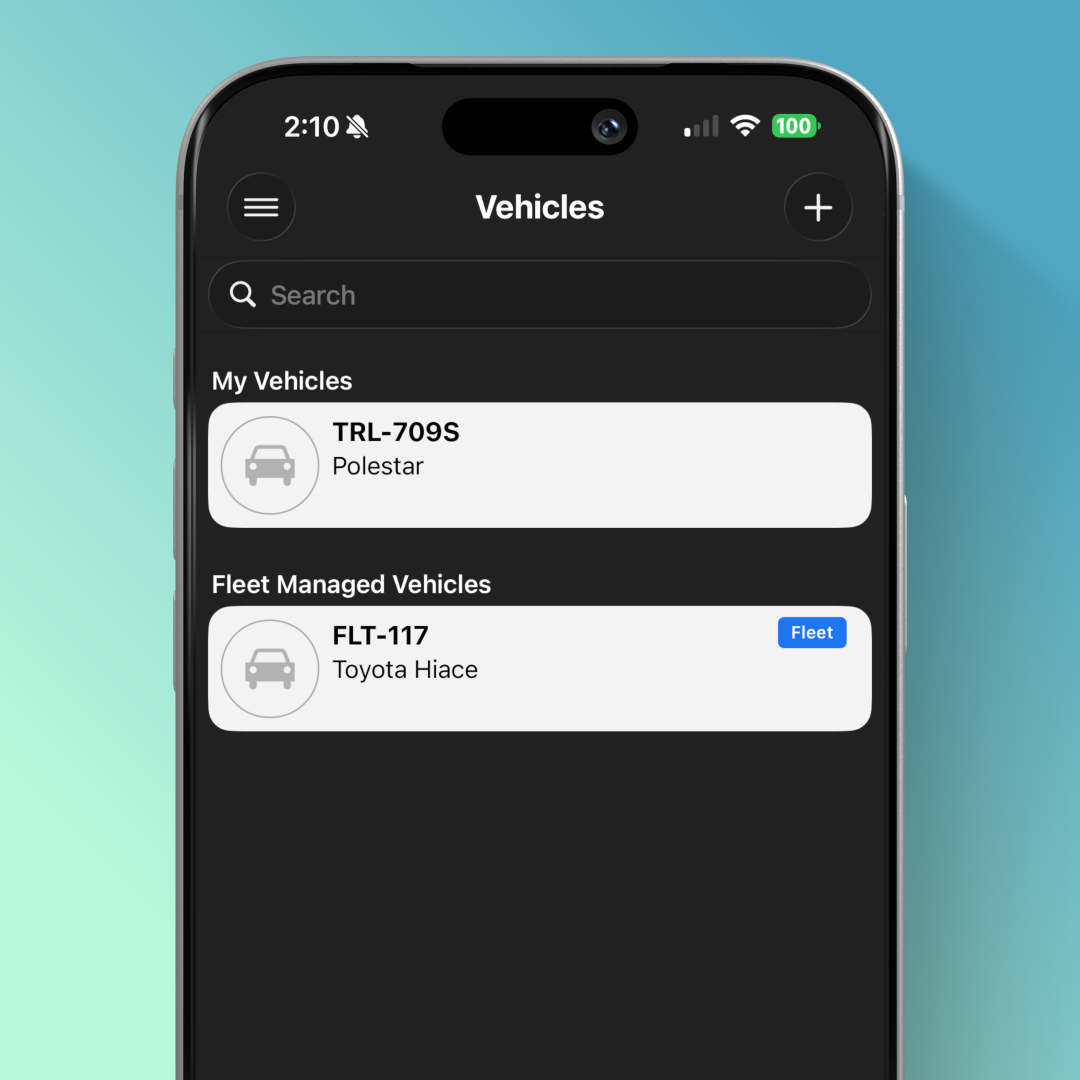
Shared fleet vehicles are vehicles managed by a fleet instead of an individual user. These vehicles can be shared with many other drivers.

A smarter way to manage team vehicle records

Travel Logs already helps individuals track mileage, expenses, maintenance, and trips. With Fleets, that same record keeping can now support team-based workflows.

Whether your organisation needs to review driver submissions, manage business vehicle records, approve expenses, or keep better oversight of fleet activity, Travel Logs Fleets helps bring the process together.

How is Travel Logs Fleets licensed?

Travel Logs Fleets is licensed per user.

Each driver, reviewer, administrator, or team member who uses Fleet features requires a Fleet licence. This helps ensure every user has the correct access to submit, review, comment on, approve, reject, and report on fleet records.

Availability and permissions may depend on the user’s role and fleet setup.

What is Travel Logs Fleets?

Travel Logs Fleets is a team feature that helps drivers submit vehicle records to a fleet team for review.

Drivers can continue using Travel Logs to track trips, mileage, expenses, and maintenance records. When records are ready, they can submit them to their fleet team, where reviewers can manage submissions from the Fleet dashboard.

Who is Travel Logs Fleets for?

Travel Logs Fleets is designed for businesses, organisations, and teams that need to collect and review vehicle records from multiple drivers.

It can help teams manage driver logbooks, review submitted trips and expenses, keep communication in context, and report on vehicle records more easily.

How do fleet submissions work?

Drivers create and manage their records in Travel Logs. When they are ready, they can submit selected records to their fleet team.

Once submitted, those records can be reviewed from the Fleet dashboard. Fleet reviewers can check the submission, view its current status, add comments, approve it, or reject it if changes are needed.

Can drivers keep private logs?

Yes. Drivers can keep their own private Travel Logs records and choose what they submit to a fleet.

Fleet teams only receive the records that a driver submits to that fleet. This means drivers can continue using Travel Logs for their personal, private, or non-fleet vehicle records without automatically sharing everything with a fleet team.

This is especially useful for drivers who use the same app for multiple purposes, belong to multiple fleets, or need to keep personal and work-related records separate.

What can fleet reviewers do?

Fleet reviewers can use the Fleet dashboard to collect, review, discuss, approve, reject, and report on submitted vehicle records.

This gives fleet teams a clearer workflow for managing submissions instead of relying on email, spreadsheets, screenshots, or separate documents.

Can reviewers leave comments on submitted records?

Yes. Fleet comments allow drivers and reviewers to discuss a submitted record without losing context.

Reviewers can ask questions, request clarification, or explain why a record was approved or rejected. Drivers can respond directly, keeping the conversation attached to the relevant submission.

Can drivers belong to more than one fleet?

Yes. Drivers can belong to multiple fleets.

This is useful for drivers who work with more than one business, team, client, or organisation. Each fleet remains separate, so drivers can submit the right Travel Logs records to the correct fleet team.

Fleet reviewers only see the records submitted to their own fleet, helping keep submissions, comments, statuses, approvals, rejections, and reports organised by team.

Frequently Asked Questions

If you have any other question?

Contact Support

© Sockii Pty Ltd 2011 - 2026. All Rights Reserved. ABN 67 160 198 685

Apple, iPad, iPhone, iPod touch, and iTunes are trademarks of Apple Inc., registered in the U.S. and other countries. App Store is a service mark of Apple Inc. Google Play and the Google Play logo are trademarks of Google Inc.